

402 challenge lists Stripe next to the other rails it accepts. The buyer’s client picks the one it can pay.
Card payments settle to your connected Stripe account, not your Proceeds wallet. Proceeds creates the charge on your account as a direct charge, so you are the merchant of record and see the payment in your Stripe Dashboard.
Requirements
Cards are charged in USD. The card amount is the paywall price: a
0.50 USDC price is a 50 cent card charge.
The $0.50 floor is Stripe's minimum card charge. A paywall priced under $0.50 can still be paid on its other rails. It just doesn’t offer cards.
1. Connect Stripe
1
Open Settings
Open the profile menu at the bottom of the left sidebar and choose Settings.
2
Connect with Stripe
Under Card payments (Stripe), click Connect with Stripe and approve Proceeds on your Stripe account. You return to Proceeds when it’s done.
3
Confirm the connection
Proceeds reads your Stripe profile (
profile_…) automatically. If Stripe doesn’t return one, paste it under Stripe profile. Cards stay off until the connection is ready: a profile id, charges enabled, and a live or test mode that matches.2. Turn on cards for a paywall
- In Paywalls, edit the paywall.
- Set the Price to
0.50or more, in whole cents. On a tiered paywall each tier is checked on its own, so each tier you want to sell by card has to meet that floor. - In Paywall Details, check that Accept card payments (Stripe) is on. It is on by default.
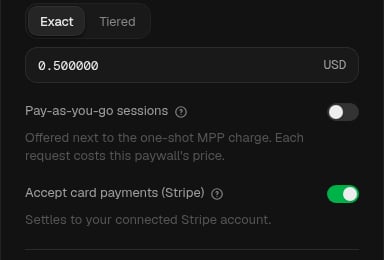
Accept card payments (Stripe) turned on
3. See the card option in the challenge
402 response includes a WWW-Authenticate: Payment challenge with method="stripe" next to your other methods. The decoded request for the Stripe challenge looks like this:
Illustrative challenge request
This example is illustrative. Your values come from your paywall and your connected Stripe account.
amount is in the smallest currency unit: with "decimals": 2, "50" is $0.50.method="stripe"? Check all of these:
- Accept card payments (Stripe) is on for the paywall.
- In Settings, the Stripe connection shows Connected. That line means the connection is active, it has a Stripe profile id (
profile_…), charges are enabled, and its live or test mode matches. Anything short of that is spelled out on the status line (profile still needed, charges not enabled, or a live/test mismatch). - The charged price is at least $0.50 in whole cents. On a tiered paywall, that is the tier the buyer pays.
paymentMethodTypes tells the buyer’s client that a card or a Link account is accepted.
How buyers pay
Buyers and agents pay with a client that supports MPP Stripe charge. The client creates a one-time Shared Payment Token for the charge and retries the request with it. Proceeds confirms the payment on your Stripe account and then proxies your API response. You don’t run any Stripe ormppx code. For the client side, see the MPP Stripe charge reference and Link.
Share the same charge URL and buyer prompt as for any paywall. See Sell to agents.
Reconcile payments
Card payments that complete show in Transactions asCompleted, with the Stripe PaymentIntent (pi_…) as the payment reference. Check Events when a card attempt doesn’t show up there. Funds settle in your Stripe account on Stripe’s payout schedule, so reconcile them in your Stripe Dashboard.
Pricing tip
Stripe’s card processing fees apply to your Stripe account on each charge. Because part of Stripe’s fee is a fixed amount per charge, a lower price keeps less of the payment. See Stripe’s pricing. If your calls are cheap, keep card-eligible endpoints at a price that covers fees, or leave cards off and take those calls on other rails.Test it
When your Stripe connection is in test mode, the console Test Payment flow includes a Card (Stripe test) option. That is the Stripe connection’s mode, not the console Mainnet mode switch. See Test paywalls. Live card payments use the buyer’s own client, as above.Configure pricing
Set prices, including the $0.50 floor for cards.
MPP Stripe charge
The protocol reference for buyers and client builders.